
Building a website used to mean sending your developer a list of changes and waiting. Then sending another list. Then waiting again. Vibe coding removes that cycle entirely. Instead of writing code or filing a request, you describe what you want in plain language and AI builds it for you.
If that sounds like something reserved for developers, it isn’t. Vibe coding is simply talking to an AI model the way you would talk to your team or a developer, and having it produce a working webpage in response. Anyone who can describe what they want can do this.
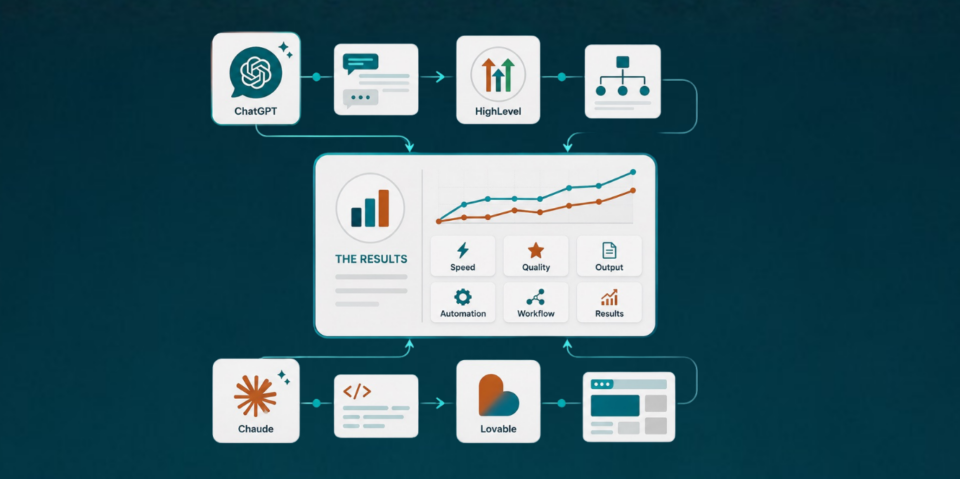
We put two vibe coding platforms to the test: HighLevel’s new AI Studio, released directly inside the platform, and Lovable, a more established standalone vibe coding tool. To make the comparison fair, we used both ChatGPT and Claude to write and refine the prompts before a single credit was spent on either builder. This article and the accompanying video walk through exactly what we built, what worked, what didn’t, and which tool we’d recommend depending on your setup.
Video Time Stamps
00:00 What vibe coding means and why it matters
02:24 The SEO/AEO page analyzer use case
03:22 Touring HighLevel AI Studio and Lovable
04:21 Using ChatGPT and Claude to build better AI prompts
10:16 Watching the Vibe Coders generate pages
11:41 HighLevel vs Lovable, pros and tradeoffs
14:50 First results and connecting to your CRM
17:48 Testing, tweaks, and what still needs work
18:33 Claude prompt comparison and output differences
19:52 Final thoughts and how to try it yourself
Links
Try HighLevel free for 30 days.
Try Lovable for free.
Need help setting any of this up? Book a free consult!
Learn more about Marketecs Engine.
What this article covers:
- What vibe coding actually means and who it’s for
- How to use ChatGPT or Claude to write a better build prompt before you touch a page builder
- A head to head look at HighLevel AI Studio and Lovable
- The real difference between the two tools once you need CRM data, not just a page
- What we would do differently next time
What Is Vibe Coding?
Vibe coding is the practice of building or editing a website by describing what you want to an AI model instead of writing code yourself. You explain the goal, the AI generates the page, and you keep refining it through conversation until it matches what you had in mind.
This is possible because tools like HighLevel AI Studio and Lovable connect a large language model directly to a page builder. The AI interprets your request, writes the underlying code, and renders a working page. From your side, it looks and feels like a conversation, not a coding project.
For business owners, this opens up a category of projects that used to require hiring a developer or waiting on an agency queue. Think:
- Lead magnets
- Calculators
- Quizzes
- Interactive tools
- Landing pages that do more than display text
The Use Case: An Interactive SEO and AEO Web Page Analyzer
Rather than test these tools on a generic demo, we tested them something we actually needed. In our SEO and AEO best practices video and article, we promised a checklist (which you can find here) to help businesses evaluate their own pages. Instead of a static PDF, we decided to try building an interactive page analyzer ‘app’ using AI.
The concept: a visitor enters their website, the tool runs an analysis, and it displays an overall score for free. To see the full breakdown, the visitor has to enter their name and email. That makes it a functioning lead magnet, not just a demo page.
This is a good example of the type of project vibe coding is well suited for. Calculators, quizzes, assessment tools, and anything else that used to require custom development are now realistic projects for a marketing team to build directly, without a developer on standby.
Getting Started: Touring Both Builders
HighLevel’s AI Studio lives inside the platform itself. Once enabled, clicking into AI Studio briefly changes the interface, but you’re still fully connected to your HighLevel account and data.
Lovable is a separate, standalone platform. You can create a free account and start describing what you want to build directly in the chat interface. The free tier includes five credits per day, which is enough to test the concept but tight if you’re iterating heavily.
Neither tool requires you to write a single line of code. The difference between them shows up in the design capability and later, once you need the page to actually do something with the data it collects.
Why Start With ChatGPT or Claude Prompts Before You Vibe Code
Before opening either builder, we chose to build the prompt using both ChatGPT and Claude, not the vibe coding tools themselves. This step is optional if you’re already a confident prompt writer, but for most people it produces a far more usable result and avoids wasting credits on a build that misses the mark.
We used a project set up in both ChatGPT and Claude that included our ideal client profile, our AEO best practices, our positioning, and notes on how we typically write. Setting up a project like this is worth doing regardless of what you’re building. It gives every conversation the same context automatically, instead of explaining your business from scratch each time.
Inside that project, we uploaded our SEO and AEO checklist. Then we asked for a prompt to vibe code an interactive page analyzer. These were the requirements:
- It needed to be interactive
- Show an overall score for free
- Gate the full breakdown behind a name and email
- Match our brand and audience
The most useful instruction in the entire prompt was the last line: “What questions do you have for me before building this?” Skipping that step is one of the most common reasons a prompt misses the mark, and then the vibe coded page doesn’t excite. Without the question, AI often fills in gaps with assumptions instead of asking, and those assumptions rarely match what you actually wanted.
Watch the video tutorial to see the exact prompting and process for utilizing both ChatGPT and Claude for our vibe code base prompt and even iterations.
ChatGPT vs Claude for Prompting: What We Found
We ran the identical starting prompt through ChatGPT and Claude at the same time to see how each one handled it.
Claude asked more clarifying questions, both in the first round and again after we answered the first set. ChatGPT asked questions too, but fewer, and it was quicker to move forward and fill in gaps with reasonable assumptions.
For content writing specifically, Claude has been our preferred model. For image prompting, ChatGPT tends to produce results we like better. Neither one is universally “better.” They simply approach ambiguity differently, and that difference showed up directly in the pages each prompt eventually produced.
The reason to start in Claude or ChatGPT is because both work on a subscription that provides ample credits for this iteration process. Refining an idea back and forth in a chat costs very little, while refining it inside Lovable or AI Studio can use credits at a much higher rate with every round.
HighLevel AI Studio vs Lovable: Key Differences
Lovable:
- More mature and further along in development
- Broader page design capabilities out of the box
- Free tier limited to five credits per day
- Requires manual setup (APIs and webhooks) to connect a page to your CRM
HighLevel AI Studio:
- In beta (at the time of this test), with occasional errors that may require a retry
- Free to use during the beta or AI promo periods, also very inexpensive with GHL’s AI plans
- Native access to CRM actions like tagging contacts and triggering workflows
- No separate integration step required to connect form submissions to your CRM
That last point ended up being the deciding factor. Lovable produced a page, but getting form submissions into a CRM meant building out webhooks and API connections separately. Inside AI Studio, connecting the finished page to the CRM was a single action. That single click added the page to ten different CRM tools at once, including lead capture and tracking, without touching a webhook.
For a marketing team without in-house developer support, that difference is significant. A well designed page that still needs a developer to make it functional is only half finished.
The Results: Which Page Design We Preferred
Going in, we expected to prefer Lovable’s output. It’s the more established tool, and it delivered a page with more depth and more written content. In practice, we preferred the page HighLevel’s AI Studio produced, even in beta.
Lovable’s version had more content, but it didn’t capture attention as quickly. It also included multiple calls to action (analyze the page, book a manual review, and learn more about the company), competing for the same click. In general, one clear call to action outperforms several competing ones on a lead capture page.
AI Studio’s page was more streamlined, matched our brand tone more closely, and had a single clear path for the visitor to follow. It wasn’t without issues. One build hit an error mid-process and required a retry. Also, there is still backend work needed for both pages to be fully functional. But as a first pass, the design and tone were closer to what we would ship.
Small details, like a weak button color on Lovable’s version, are easy to fix with a follow-up prompt specifying an exact color code. The bigger structural differences, like the number of competing calls to action, take more deliberate prompting to avoid in the first place.
Round Two: Testing the Claude Prompt
To isolate how much of the result came from the prompt itself, we repeated the entire process using the prompt Claude generated instead of ChatGPT’s version, feeding it into both builders again.
The Lovable page built from the Claude prompt was noticeably shorter and drifted further from our brand than the first version. It would have needed real iteration before it was usable. The AI Studio page built from the same prompt looked better and matched our tone more closely than its first attempt, though functionality still needed work.
Overall, we got more consistent, more brand accurate results from the ChatGPT prompts across both builders. We also hit ChatGPT’s usage limits less often, though that may partly reflect how much longer we’ve been using it compared to Claude for this kind of task.
What This Means If You’re Getting Started
You don’t need to run four different combinations of tools the way we did for this test. Pick one large language model (AI LLM) you already use, and pick one vibe coding platform. If you’re a HighLevel user, starting inside AI Studio makes sense, especially if your project needs to connect to your CRM. If you need more design maturity today and don’t mind handling the integration work separately, Lovable is a strong option.
Vibe Coding Checklist
- Choose one large language model (ChatGPT, Claude, or similar) and build a project with your brand details, audience, and writing style
- Describe the page or tool you want in plain language
- End your prompt by asking what questions the AI has before building
- Answer those questions with specific detail, not general statements
- Take the finished prompt into your builder of choice (AI Studio, Lovable, or similar)
- Review the output for tone, structure, and number of calls to action
- Confirm whether the page needs to connect to a CRM
- Check what that setup requires before you commit to a platform
- Publish and test your build
That sequence protects your credits and gives the AI the context it needs to get closer to the right result on the first attempt.
FAQ
What is vibe coding?
Vibe coding is building or editing a website or app by describing what you want to an AI model in plain language, instead of writing code. The AI generates the page and continues to refine it as you provide feedback.
Do I need coding experience to vibe code a website?
No. The entire process happens through conversation. If you can describe what you want clearly, you can vibe code a page or app.
Is HighLevel AI Studio free to use?
AI Studio is/was free while in beta and during AI promo periods. You may need to verify pricing at this time.
Should I use ChatGPT or Claude to write my prompt first?
It’s not required, but it helps. Writing and refining your prompt in a chat interface first is typically less expensive than iterating directly inside a credit based builder, and it produces a more complete prompt on the first try. And our experience to date is that ChatGPT writes better prompts, while Claude writes better copy and content. However, both perform better when given context in a project setting.
Which is better, HighLevel AI Studio or Lovable?
It depends on your setup. Lovable currently offers more mature design capabilities, but connecting a page to a CRM requires separate API and webhook work. AI Studio performed admirably in our test (even while still in beta) and includes built-in CRM actions, which matters if your page needs to capture and route leads automatically.
Final Thoughts
Vibe coding turns website building into a conversation instead of a project. That doesn’t mean the output is perfect on the first try. Both of the tools we tested still needed follow-up work, but you can go from an idea to a working page without waiting on a developer’s schedule.
If your business already runs on HighLevel, AI Studio is worth testing now while it’s free and directly connected to your CRM. If you want to see what’s possible with a more established tool, Lovable is worth a look as well. Either way, start the process in ChatGPT or Claude and ask what questions the AI has before it builds. You’ll save both time and credits once you move into the builder itself.
Ready to put this to work in your own business? Try HighLevel free for 30 days and get our onboarding guides, templates, and private community access when you sign up through Marketecs, or book a free consult if you’d rather chat about having us build it with you.