Most businesses treat social media like a chore that resets every Monday. Come up with an idea, write the post, find an image, publish it, and repeat next week with nothing carried over from the last one. That approach burns time and produces content that feels rushed because it usually is.
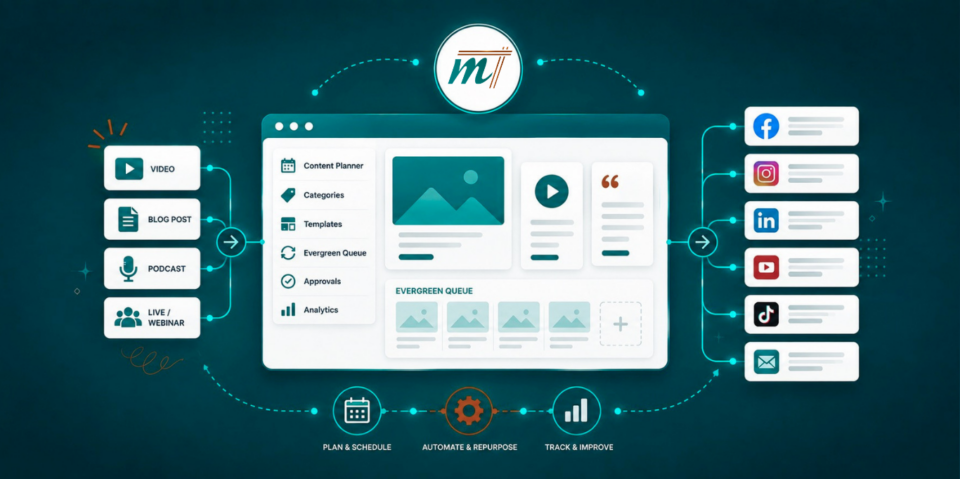
GoHighLevel, the platform behind Marketecs Engine, has a Social Media Planner that lets you:
- Schedule posts across multiple platforms,
- Import existing content libraries through CSV,
- Set up recurring and evergreen posts,
- Automatically share reviews, and
- Organize everything into content categories or queues that recycle over time.
And now, the Ask AI or managed agent features in GHL can draft a week’s worth of posts, generate matching images, and schedule them automatically, using your brand voice and audience details.
Watch the full walkthrough here.
Video Time Stamps
00:00 Why most social media content gets wasted
00:37 GoHighLevel Social Planner overview
02:25 Content tools: recurring posts, reviews, RSS, templates
03:54 Content categories and queues for evergreen posting
05:11 Comments, stats, social listening, and settings
06:20 Using Ask AI to plan a week of content
08:09 AI-generated posts, images, and scheduling results
09:56 Claude vs GoHighLevel for social content creation
13:07 Final edits, categories, and repurposing strategy
14:25 How to build a reusable social content system
Links
Learn more about Marketecs Engine and its capabilities.
Need Help? Book a free consult.
Check out our YouTube Channel for more tips and tutorials.
Get our Free AI Powered Funnel Designer.
Why Repurposable Content Beats Constant Content Creation
Anyone can post on social media. The harder question is how to make that effort worth the time it takes, especially for a small business without a dedicated content team. A repurposable system answers that question by shifting the work from ongoing to upfront. You build a library of solid content once, categorize it, and then let it recycle on a schedule instead of starting from a blank page every week. The result is a feed that stays active with far less recurring effort.
Inside the GHL Social Media Planner
The Social Media Planner sits under the Marketing section in GoHighLevel and gives you both a list view and a calendar view of everything scheduled. You can connect multiple social accounts and post to most of them at once, with the current exception of X (formerly Twitter), which isn’t supported for direct posting yet. If you connect Facebook or Instagram, the platform can also sync your past 30 days of posts, giving you a starting view of what’s already been published.
Filtering lets you sort by status, so you can quickly see what’s pending, what’s already posted, and what’s scheduled for later. It’s a seemingly small feature, but it matters once your queue has more than a handful of posts running at once.
Migrating Existing Social Content with CSV Imports
If you’re moving from another social media planner, you don’t have to rebuild your content library manually. GHL supports CSV imports, so you can export your existing posts from wherever they currently live and bring them into GoHighLevel in bulk. This is particularly useful for businesses with a large backlog of recurring posts, since reviewing and adjusting an imported batch takes a fraction of the time it would to recreate everything one at a time.
Recurring Social Posts: Automating Regular and Seasonal Content
Recurring posts handle anything that repeats on a known schedule. If you’re promoting a monthly event, you set it up once and it continues to post automatically. The same logic applies to fixed-date content like holidays. A St. Patrick’s Day post, for example, can be set to go out every March 17th without you needing to remember it or rebuild it each year.
Automatic Review Sharing from Reputation Management
If you’re already using GoHighLevel’s reputation management tools to collect testimonials and reviews, you can turn on automatic sharing so those reviews post directly to your social accounts as they come in. It’s a simple setting, but it fills your feed with real customer feedback without any manual work, and social proof tends to perform well precisely because it doesn’t read like a typical promotional post.
RSS Feeds and the GHL Template Library
You can also generate social posts automatically from an RSS feed, such as your blog, so new content publishes to social the moment it goes live. Separately, the GHL platform includes a template library covering a range of industries and use cases, which you can review, customize, and schedule directly. It’s a useful starting point if you’re building out a content library from scratch and need a base to work from rather than a blank editor.
Team Approvals and Comment Management
For businesses with more than one person touching content, an approval workflow lets you assign posts to a team member, notify them, and require sign-off before anything goes live. Comments across your connected platforms are also consolidated into one inbox inside the GHL social planner, so you’re not logging into five different apps just to respond to engagement.
Cross-Platform Statistics and Social Listening
Statistics across all your connected platforms are available in one place, with a recent update adding a customizable date range instead of a fixed reporting window. Social listening is a newer, still-developing feature that surfaces general trends, and it’s one to keep an eye on as GoHighLevel continues expanding it.
GHL Social Settings: Communities, Notifications, and Watermarks
The Settings area covers the usual account connections, but a few details are worth calling out. If you have communities or memberships built inside GoHighLevel, you can post directly to them from the same social planner. You can also set up notifications for disconnected accounts or new comments, and add watermarks that apply automatically to any images you generate inside the platform, which saves a manual editing step every time you publish.
GHL Content Categories and Queues: The Core of a Repurposable System
This is the feature the entire repurposable strategy is built around, and it’s easy to overlook if you’re only using the planner for one-off posts.
Content categories, which feed content queues, let you build a library of posts organized by topic. A common example is a “Questions” category made up of FAQ-style posts that answer what prospects commonly ask. Inside each category, you control how many posts are in the queue, how often they go out, and the order they post in. You can edit individual posts, clone them, create variations with different images, and reorder the entire queue as needed.
Once a content category is built out, you can turn it on as a content queue and it runs on the calendar automatically, cycling through the posts in that queue on whatever schedule you’ve set. A good rule of thumb is to build a queue of at least 20 posts per category. Posting at least once a week means a 20-post queue takes roughly five months to cycle through once, which keeps the repetition from becoming obvious or your content from becoming stale.
This is what separates a repurposable system from a normal posting schedule. You put in a concentrated block of effort building the library, then let it run largely on its own, only adding new posts as new topics or ideas come up.
Building and Scheduling a Week of Content with Ask AI in GHL
Ask AI is one of GoHighLevel’s newer additions, and it’s worth testing directly inside the planner workflow. Because GHL already has your brand voice, ideal client profile, and brand colors configured, Ask AI can generate content suggestions that already reflect your business rather than generic output.
A simple prompt, something like “help me plan the social media I need,” is enough to get topic ideas along with suggested posting times. From there, Ask AI can draft full posts complete with hashtags and formatting, generate matching images for each post, and schedule everything directly into the planner, all from a single conversation. It’s worth noting that even a basic prompt produces reasonable results, and giving it more specific direction, such as platform-specific length requirements, will likely sharpen the output further.
The tradeoff is speed. Having Ask AI handle drafting, image generation, and scheduling in sequence takes longer than doing each step manually, since it’s working through the full process rather than executing one command. The advantage is that it frees you up to work on something else while it runs, rather than requiring your full attention the entire time.
One current limitation is that Ask AI does not automatically assign posts to content categories. If you want scheduled posts to land in a specific queue, you’ll need to either include that instruction directly in your prompt or go in afterward, open the post’s advanced options, and assign the category manually. Once assigned, the post displays a colored border in the planner, making it easy to confirm at a glance which posts are tied to a queue.
GHL AI vs. Claude: Where Each Tool Fits
For comparison, running the same prompt through Claude, especially with a project set up that includes your ideal client profile, product details, and preferred voice, tends to produce stronger copy. Claude also tends to ask more clarifying questions before drafting, which can lead to more tailored results.
Where GoHighLevel’s Ask AI has the edge is image generation and the ability to take action directly, meaning it can generate matching visuals and schedule the finished posts without you needing to copy content between tools. If you draft in Claude, you’ll still need to bring that copy back into GoHighLevel and either generate images there or pair it with your own visuals before scheduling.
Neither approach is universally better. Some businesses will prefer keeping the entire process inside GoHighLevel for the sake of speed, while others will prefer stronger copy from Claude and are fine with the extra step of moving it over. Either way, always review AI-generated content before it goes live. Treat the draft as a starting point, not a final version, and edit it enough that it sounds like your business rather than a template.
Putting It All Together: A Repurposable Content Marketing Workflow
The strongest version of this system combines several of the pieces above rather than relying on just one. A practical approach looks something like this: build out three or four content categories covering your most common topics, whether that’s FAQs, testimonials, tips, or promotions, with at least 20 posts in each. Turn on automatic review sharing so testimonials post themselves as they come in. Set up recurring posts for anything tied to a fixed date, like holidays or recurring events. Then use Ask AI or Claude periodically to refresh a category or fill in a new one as your business evolves.
Once that structure is in place, your ongoing time investment in social media drops significantly. You’re not creating content from scratch every week. You’re maintaining a system that was built to run mostly on its own.
Frequently Asked Questions
What is a social content queue in GoHighLevel?
A content queue, utilizes content categories to build a library of posts grouped by topic that you can schedule to recycle automatically over time, rather than being posted once and never used again.
How many posts should be in a social media content queue?
A good starting point is at least 20 posts per category. Posting once a week, that gives you roughly five months before the queue repeats, which keeps the recycling from feeling obvious to your audience.
Can Ask AI schedule social media posts automatically in GoHighLevel?
Yes. Ask AI can draft posts, generate matching images, and schedule the finished content directly into the Social Media Planner based on a prompt, using your existing brand voice and audience details.
Does GoHighLevel support posting to X (Twitter)?
Not currently. Most other major platforms are supported for direct posting and scheduling, but X is not yet included.
Should I use Ask AI or Claude for social media content?
Both have strengths. Claude tends to produce stronger written copy, especially with a project configured around your brand. Ask AI in GoHighLevel tends to generate better matching images and can schedule everything directly without moving content between tools. Many businesses use a mix depending on the post.
Where to Start
If your social media strategy currently depends on remembering to post every week, start with one content category. Pick your most common topic, whether that’s FAQs or customer stories, build out 15 to 20 posts, and turn it on. From there, layer in recurring posts, automatic review sharing, and Ask AI as you get comfortable with the system.
If you’d like help setting this up inside your own account, book a strategy consultation or learn more about how Marketecs Engine brings a full content and marketing system together in one place.