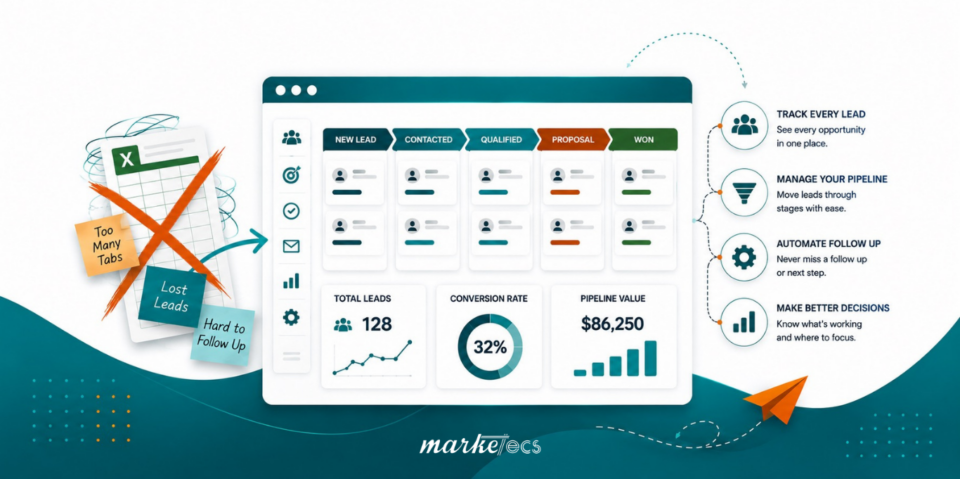
If your leads are tracked across spreadsheets, inboxes, sticky notes, and someone’s memory, your sales process is probably harder to manage than it needs to be. A GoHighLevel lead pipeline can centralize lead tracking, automate routine follow-up, show where every opportunity stands, and connect sales activity with onboarding, all inside the same platform that powers our software, Marketecs Engine.
The key is not to automate everything. The best pipeline combines automated actions with clearly defined points where a person needs to review, qualify, customize, or make a decision.
Watch the full walkthrough here: How to Build an Automated Lead Pipeline in GoHighLevel
Video Time Stamps
00:00 Why leads get lost
02:18 What a pipeline actually is
05:23 Why an all-in-one system matters
07:46 GoHighLevel pipeline walkthrough
10:05 Prospecting and sales pipeline examples
19:30 Onboarding pipeline example
20:44 How to configure pipelines in HighLevel
25:03 Workflow automations and lead scoring
29:18 What not to automate
32:47 Common pipeline mistakes to avoid
39:07 Final thoughts
Links
Try HighLevel free for 30 days.
Need help setting any of this up? Book a free consult!
Learn more about Marketecs Engine.
An automated lead pipeline in GoHighLevel uses opportunities, pipeline stages, and workflows to move leads from first contact to close without manual tracking. Forms, appointment bookings, and other triggers automatically create or update opportunities, lead scoring flags high-intent prospects, and stalled-stage alerts prevent leads from being forgotten. Sales and onboarding typically run as separate pipelines connected by a single trigger, such as a signed contract.
What this article covers
- What is a lead pipeline?
- Why lead pipeline automation matters
- How to structure a GoHighLevel sales pipeline
- How to automate lead capture
- How lead scoring identifies high-intent prospects
- What to automate, and what to leave to a person
- Connecting sales and onboarding pipelines
- Common pipeline mistakes
- How to build one step by step
- FAQ
What Is a Lead Pipeline?
A lead pipeline is a visual representation of the steps a prospect moves through from initial contact to becoming a customer.
For a service business, that journey might look something like:
New Lead → Qualification → Contacted → Appointment Booked → Appointment Attended → Proposal Sent → Contract Signed → Onboarding
The exact stages will vary by business.
The important part is that each stage represents a meaningful point in the customer journey. Your team should be able to look at the pipeline and understand what has happened, what needs to happen next, and which opportunities require attention.
GoHighLevel refers to these records as opportunities. An opportunity represents a potential deal and can contain the associated contact, pipeline, stage, value, owner, notes, and other information.
That distinction matters because a contact and an opportunity are not necessarily the same thing. A person can exist in your CRM without representing an active sales opportunity.
Why Does Lead Pipeline Automation Matter?
The biggest problem with a manual pipeline is not that spreadsheets are inherently bad. The problem is that someone has to remember to keep the spreadsheet accurate.
A lead fills out a form. Someone needs to notice, then follow up and record the follow-up.
Someone needs to update the lead’s status.
Someone needs to remember the next follow-up.
Then someone needs to repeat the process for every lead.
That system becomes increasingly fragile as lead volume increases.
Speed matters, too. InsideSales’ 2021 lead response research analyzed more than 55 million sales activities involving 5.7 million inbound leads across more than 400 companies. The study found that conversion rates were 8 times greater when a response was attempted within the first five minutes compared with waiting longer. It also found that 57.1% of first call attempts happened more than a week after the lead came in.
The lesson is straightforward: a good pipeline should make it difficult for a new lead to disappear.
Automation can help by turning an event into an action.
For example:
Form submitted → Create opportunity → Add to New Lead stage → Send confirmation → Notify salesperson → Start follow-up sequence
GoHighLevel’s current workflow functionality supports this type of setup, including automatically creating or updating an opportunity after a form submission.
How Should You Structure a GoHighLevel Lead Pipeline?
Before creating stages inside GoHighLevel, map the actual customer journey.
Do not begin by creating ten columns because they sound useful. Begin with the question: What actually happens between a new lead entering our system and that person becoming a customer?
For example, a straightforward service-business sales process might be:
| Stage | What it means | Possible automation |
|---|---|---|
| New Lead | New inquiry has entered the system | Create opportunity and notify team |
| Qualification | Lead needs review | Assign task or internal notification |
| Contacted | Initial outreach has occurred | Start appropriate follow-up |
| Appointment Booked | Consultation is scheduled | Send reminders |
| Appointment Attended | Meeting took place | Create follow-up task |
| Proposal Sent | Customized proposal has been delivered | Track time in stage |
| Contract Signed | Deal is ready to convert | Start onboarding |
| Lost / Not a Fit | Opportunity is no longer active | Remove from active sales follow-up |
These stages are examples, not a template you should copy blindly. GoHighLevel itself recommends making stages reflect the actual steps in your sales process.
The pipeline should be specific enough that another team member can understand it without asking what each stage means. But it should not be so granular that every email, phone call, click, or minor activity becomes its own stage.
A Useful Rule for Lead Pipeline Stages
A stage should answer: “What meaningful state is this opportunity in right now?”
It should not answer: “What individual action did someone take five minutes ago?”
For example, “First Email Sent” may be useful in some sales processes, but “Email Opened” probably does not need to become a pipeline stage.
Those details can be tracked through activity, workflow logic, tags, scoring, or other CRM data.
How Can You Automate Lead Capture using GoHighLevel?
The first stage of your pipeline should ideally have a reliable entry point.
This is one of the most important recommendations from the process demonstrated in the video: do not make your team responsible for remembering to add every new lead manually.
If someone fills out a website form, submits a lead magnet request, books an appointment, or triggers another defined entry condition, that action can become the starting point for your workflow.
For example:
- A prospect submits a contact form.
- GoHighLevel creates or updates the contact.
- A workflow creates an opportunity.
- The opportunity enters the New Lead stage.
- A confirmation message is sent.
- The appropriate team member receives a notification.
- Follow-up automation begins.
GoHighLevel currently supports automated opportunity creation from events such as form submissions, appointment bookings, contact creation, survey submissions, payments, and other triggers.
That means the pipeline can update based on what actually happens in the business rather than relying on someone to maintain a separate spreadsheet.
How Does Lead Scoring Fit Into an Automated Pipeline?
Not every lead deserves the same level of immediate attention.
Someone who downloaded one resource is different from someone who has opened several emails, clicked links, visited key pages, submitted a form, and booked a consultation.
Lead scoring can help create that distinction.
The approach demonstrated in the video uses engagement scoring to identify prospects as they become increasingly engaged. Actions such as email engagement, form submissions, landing page activity, and appointment bookings can contribute to a score. Once a prospect reaches a defined threshold, automation can move them into a higher-priority stage and notify the appropriate person.
For example:
Engagement score reaches threshold → Move to Hot Lead → Notify salesperson → Remove from lower-priority nurture → Begin sales workflow
The actual score and thresholds should be based on your business. A score that makes sense for one company may be meaningless for another.
The important idea is to define what “high intent” means and give your system a way to recognize it.
How Can GoHighLevel Automate Sales Follow-up?
A sales pipeline becomes much more useful when pipeline movement and workflows work together.
Consider a typical sequence:
New Lead → Outreach → Appointment Booked → Appointment Attended → Proposal Sent → Contract Signed
Each transition can potentially trigger another action.
If an appointment is booked, the opportunity can move to the appointment stage.
When a contract is sent, the opportunity can move to the contract stage.
When the contract is signed, the opportunity can move toward onboarding.
If an opportunity sits in one stage longer than expected, the system can notify someone that it needs attention.
GoHighLevel supports workflow triggers and actions around opportunity creation and status changes, making this type of stage-based automation possible.
The result is a pipeline that reflects actual customer activity rather than a manually maintained snapshot.
What Should You Automate in a Sales Pipeline?
A useful way to think about automation is to automate the predictable and review the important.
Good candidates for automation include:
- Creating opportunities from inbound forms
- Sending immediate confirmation messages
- Assigning leads to team members
- Starting nurture sequences
- Sending appointment reminders
- Updating opportunity stages after defined events
- Applying tags
- Triggering internal notifications
- Creating follow-up tasks
- Alerting the team when an opportunity has stalled
- Moving converted customers into onboarding
- Removing unsubscribed or disqualified records from inappropriate workflows
GoHighLevel’s workflow system is designed for repetitive tasks such as follow-up, lead management, communications, and task assignment.
The goal is not to eliminate human involvement. The goal is to reserve human involvement for the parts of the process where judgment actually adds value.
What Should You Not Automate in a Sales Pipeline?
This is where many automation projects go wrong.
The fact that something can be automated does not mean it should be automated.
The video identifies several areas where human review should remain part of the process.
1. Qualification decisions
If determining whether someone is a good fit requires context, have a person review it. Automation can identify the opportunity and notify the right person. It does not necessarily need to make the final decision.
2. Customized proposals
If your proposals depend on the prospect’s situation, needs, scope, pricing, or conversations during a sales call, keep the customization manual. You can still automate the pipeline movement after the proposal is sent.
3. Bad-fit decisions
A form response may suggest that someone is not a good fit, but a human should be able to review the situation before making a final decision.
4. Stalled opportunities
Automation is excellent at identifying a stalled opportunity. The decision about what to do next should usually remain with a person.
Is the deal genuinely dead?
Does the prospect need a different offer?
Should the salesperson follow up?
Should the opportunity be closed?
Automation can raise the flag. Your team should decide what the flag means.
5. Strategic meeting follow-up
A personalized follow-up after a sales conversation often requires context.
AI can help summarize the meeting or prepare a draft, but the final communication may need to come from a person who understands the relationship and the strategy. A good automated pipeline should make human follow-up easier, not make it feel robotic.
How Can You Prevent Stalled Leads From Getting Lost?
One of the most useful automations in a sales pipeline is a stalled-opportunity alert.
Suppose your normal sales process says a proposal should receive a response within five days.
You can build a rule around that expectation.
Proposal Sent → Wait five days → Check stage → If still there, notify salesperson
That creates a simple safety net.
The salesperson does not need to remember every date. The system tells them which opportunities have exceeded the expected amount of time in a stage.
GoHighLevel’s pipeline functionality is specifically designed to help teams identify where opportunities are sitting and where deals may be getting stuck.
The video’s approach takes this a step further by using automated notifications for opportunities that remain in a stage too long.
Why Should Sales and Onboarding Use Separate Pipelines?
A common mistake is trying to force the entire customer journey into one giant pipeline.
Sales and onboarding are different processes.
A sales pipeline might look like:
New Lead → Qualified → Appointment → Proposal → Contract → Won
An onboarding pipeline could then begin:
New Client → Welcome → Data Collection → Onboarding Meeting → Internal Setup → Ready for Delivery
The customer has not disappeared from your system. Their process has changed.
This gives your sales team visibility into sales activity while giving your delivery or onboarding team a clear process to follow.
The video specifically recommends thinking about pipelines as processes, not simply sales opportunities.
GoHighLevel also supports pipelines for sales and service workflows, allowing businesses to map different customer journeys to different sets of stages.
How Can Marketecs Engine Connect Lead Tracking, Sales, and Onboarding?
Marketecs Engine is built around the same core idea demonstrated in the video: your CRM, pipeline, communication, appointments, and workflow automation should work together instead of operating as separate systems.
That means you can create a connected process where:
Lead captured → Lead scored → Lead followed up → Appointment booked → Sales opportunity updated → Contract completed → Customer onboarded
Instead of asking your team to manually update every system, the goal is to have customer actions drive the appropriate changes. The difference becomes especially important as a business grows. A process that works when one person manages ten opportunities can become difficult when multiple people are managing dozens or hundreds.
A connected pipeline gives the team a shared view of what is happening.
What are the biggest GoHighLevel pipeline mistakes?
Mistake 1: Creating too many stages
If your pipeline has a stage for every minor action, your team will eventually stop using it. Keep stages focused on meaningful changes in the customer journey.
Mistake 2: Making stages too vague
“Follow Up” is usually not enough.
Follow up with whom? About what? What has already happened? What happens next?
Your stages should give enough context that someone else can step into the process without reconstructing the history from scratch.
Mistake 3: Combining unrelated processes
Lead generation, sales, and onboarding may be connected, but they do not necessarily belong in one pipeline. Use separate pipelines when the processes have materially different stages, owners, or objectives.
Mistake 4: Leaving dead leads in the pipeline
A pipeline filled with stale opportunities becomes difficult to trust. Create rules for reviewing inactive leads and deciding whether they should be closed, moved to nurture, or re-entered later.
Mistake 5: Not defining entry and exit rules
Every pipeline should have a clear answer to two questions:
- What causes someone to enter this pipeline?
- What causes them to leave it?
For example:
Lead pipeline entry: New qualified inquiry
Lead pipeline exit: Becomes active sales opportunity
Sales pipeline exit: Won, lost, or otherwise closed
Onboarding pipeline exit: Onboarding completed
These rules prevent opportunities from becoming permanent residents of one stage.
Mistake 6: Building the pipeline and then ignoring it
A pipeline needs to be used before you know whether it works. Your first version will probably need adjustment.
You may discover that one stage is never used. Another stage may contain almost everyone. A team member may repeatedly ask what a particular stage means.
Those are signals that the system needs refinement.
GoHighLevel’s own current guidance emphasizes keeping pipelines simple, automating intelligently, reviewing them regularly, and using performance data to optimize the process.
Mistake 7: Keeping the pipeline disconnected from everything else
This is perhaps the biggest issue.
A pipeline sitting by itself is just another place for your team to enter information.
The real value comes from connecting it to:
- Forms
- Calendars
- SMS
- Workflows
- Lead scoring
- Tasks
- Notifications
- Contracts
- Payments
- Reporting
- Onboarding processes
That is when the pipeline becomes part of the operating system for your sales process.
How Do You Build an Automated Lead Pipeline That Your Team Will Actually Use?
Start with the process, not the software.
Step 1: Map the customer journey
Write down every meaningful stage from first contact through conversion and onboarding.
Step 2: Separate different processes
Decide whether you need separate pipelines for prospecting, sales, onboarding, customer retention, or different offers.
Step 3: Define entry rules
Decide exactly what causes a contact to enter each pipeline. Whenever possible, make this automatic.
Step 4: Define exit rules
Decide what event moves someone out of the pipeline or into the next one.
Step 5: Identify automation opportunities
For each stage, ask:
What can the system know without a person telling it?
- A form submission can be detected.
- An appointment booking can be detected.
- A contract signature can be detected.
- A payment can be detected.
An email interaction can be tracked.
A human’s judgment is different. Build the workflow around that distinction.
Step 6: Add human review points
Clearly identify where someone needs to make a decision. Create tasks and notifications so those reviews do not get forgotten.
Step 7: Add stalled-stage alerts
Determine how long an opportunity should normally remain in each stage. If it exceeds that period, notify the appropriate person.
Step 8: Connect reporting
Use dashboards and reports to answer practical questions:
- How many opportunities are active?
- How much potential revenue is in the pipeline?
- Where are opportunities accumulating?
- Which stages have the longest delays?
- How many leads are becoming appointments?
- How many opportunities are converting?
- Where are leads dropping out?
Step 9: Review and refine
Do not assume your first pipeline is your final pipeline.
Use it and watch where people get confused.
Look at the data.
Remove unused stages and clarify vague ones.
Adjust automation rules.
The pipeline should become easier to operate as you learn more about your actual sales process.
What Does a Good Automated Sales Pipeline Look Like?
A good pipeline is not the one with the most automation. It’s the one where the right information appears in the right place at the right time, without forcing your team to maintain it manually.
For a typical service business, the system might work like this:
- Lead enters
- Opportunity is created
- Immediate follow-up begins
- Lead scoring begins
- High-intent prospects are identified
- Appointment is booked
- Sales process continues
- Stalled deals trigger reminders
- Customer conversion starts onboarding
- Onboarding is tracked separately
That is the difference between an automated pipeline and a spreadsheet with more features.
Frequently Asked Questions About GHL Opportunites Automation
What is a GoHighLevel pipeline?
A GoHighLevel pipeline is a visual workflow that organizes opportunities into defined stages of a sales or service process. Each opportunity represents a potential deal and moves through stages as the customer progresses.
Can GoHighLevel automatically add leads to a pipeline?
Yes. GoHighLevel workflows can create or update opportunities based on triggers such as form submissions and other customer actions.
Can GHL automatically move leads between pipeline stages?
Yes. Workflow automation can update opportunity stages when defined events occur. For example, a business can use an appointment booking or other trigger to move an opportunity to the appropriate stage.
Should every lead be automatically moved through the sales pipeline?
No. Automation should handle predictable events, while qualification, customized proposals, bad-fit decisions, stalled-deal reviews, and strategic follow-up may still require human judgment.
Can I use separate pipelines for leads, sales, and onboarding?
Yes. Separate pipelines can make sense when the stages, responsibilities, and objectives differ. The video’s process uses prospecting, sales, and onboarding as distinct processes.
How many stages should a sales pipeline have?
There is no universal number. Use enough stages to make the customer’s current position and next action clear, but avoid creating a stage for every minor activity.
What should I do with leads that stop responding?
Do not allow them to remain indefinitely in active stages. Use automated reminders to flag stale opportunities, then have a person decide whether to continue follow-up, move the contact into nurture, close the opportunity, or take another appropriate action.
Is GoHighLevel enough by itself to automate a sales process?
The platform provides the core capabilities for pipelines, opportunities, workflows, CRM data, communications, appointments, and related automation. The bigger challenge is designing the process correctly and connecting those components.
The Goal is to build Pipelines Your Business Can Trust
The best automated lead pipeline is one your team can trust to reflect reality.
When a new lead arrives, it should appear where it belongs.
If someone books a meeting, the system should know.
When a contract is signed, the sales process should change.
When a customer becomes a client, onboarding should begin.
If an opportunity sits untouched for too long, someone should know.
And when a human decision is required, the system should make that review obvious rather than trying to make the decision itself.
That is the real opportunity with GoHighLevel and Marketecs Engine.
You are not simply building another CRM view. You are building a connected process for capturing leads, following up, converting opportunities, and onboarding customers.
If your current sales process still depends on spreadsheets, memory, manual status updates, and scattered follow-up, map your customer journey first. Then identify the five repetitive actions your team performs most often. Those are the first places to look for automation.
Want to see how this works in practice? Book a strategy consultation and we’ll walk through your current sales process together, or watch the accompanying video to see the pipeline, lead scoring, workflows, smart tags, sales stages, onboarding process, and automation examples in action.