Marketing automation workflows let your systems respond automatically when a prospect or customer takes an action. A form submission can trigger an email, add a tag, notify your team, and start a follow-up sequence, all without anyone touching it. The key is to start with a process you already understand, then automate the repetitive parts.
This guide covers the fundamentals of marketing automation and walks through building a simple lead magnet workflow in GoHighLevel, the platform that also powers Marketecs Engine.
Video Time Stamps
00:00 Marketing Automation 101 Intro
01:27 Tools & Platforms (GHL + Others)
03:57 What Marketing Automation Really Means
05:29 The 5 Parts of a Workflow
12:32 Simple Workflow Examples (What to Automate First)
14:59 Building a Lead Magnet Workflow (Step-by-Step)
16:51 Naming Conventions & Organization
19:52 Triggers, Tags & Workflow Setup
25:15 Writing the Delivery Email (Most Important Step)
34:53 Follow-Up Sequence Structure
38:11 Scaling with CRM, Tags & Pipelines
39:00 Common Mistakes to Avoid
43:24 Final Thoughts & Next Steps
Links
Try HighLevel free for 30 days.
Need help setting workflows up? Book a free consult!
Learn more about Marketecs Engine.
What this article covers:
- What a marketing automation workflow actually is
- The five core components of a workflow
- How to choose your first process to automate
- How to build a simple lead magnet workflow in GoHighLevel
- How to use tags, delays, follow-up emails, and conditional logic
- How to scale a basic workflow into a broader CRM system
- Common automation mistakes that create more problems than they solve
- Where AI can help with workflow creation
What Is a Marketing Automation Workflow?
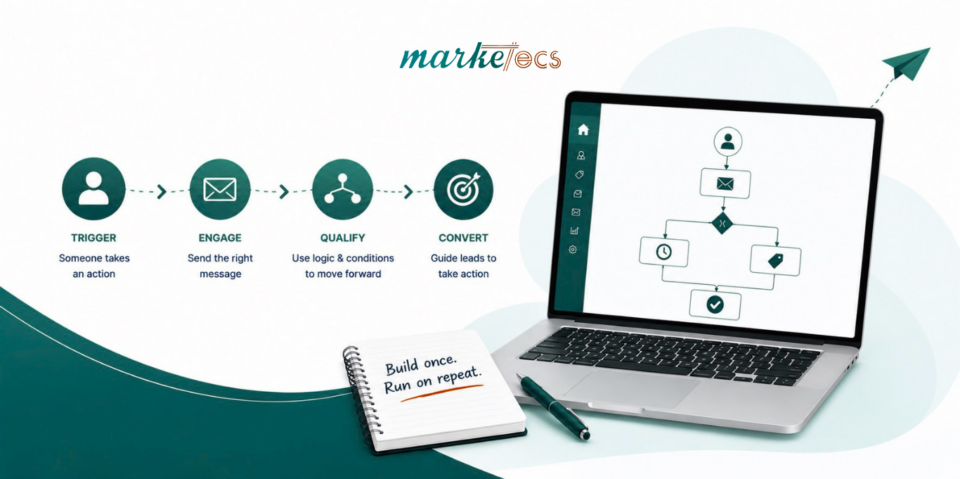
A marketing automation workflow is a defined sequence that runs when a specific event occurs, such as a form submission triggering a delivery email, a CRM tag, a team notification, and a follow-up sequence. Every workflow needs a trigger, a set of actions, and clear exit conditions so contacts don’t get stuck receiving messages that no longer apply to them.
At its simplest: when this happens, do this, then do this, unless this happens, in which case stop or change direction.
For example: someone submits a lead magnet form, gets tagged, receives the download email, your team gets notified, and after a short wait, a follow-up email goes out.
GoHighLevel’s workflow builder uses this same model. Triggers start a workflow based on an event. Actions execute what follows. Conditions branch the path based on behavior. Exit logic determines when someone should stop moving through it.
Marketing automation is also increasingly tied to AI. Salesforce’s latest State of Marketing research found that 75% of marketers have adopted AI, yet 69% still struggle to respond promptly and 84% run generic campaigns. Automation closes that gap, but only if the underlying process is sound. Automating a bad process just executes the wrong thing faster.
The Four Parts of Every Workflow
Trigger: the event that starts it. Common examples include a form submission, appointment booking, missed call, tag added, link clicked, or payment received. For your first workflow, keep this simple. A form submission works well because the event and the desired response are both easy to define.
Actions: what happens after the trigger. Sending an email or SMS, adding a tag, updating a field, creating a task, notifying a team member, or creating an opportunity are all standard actions.
Conditional logic: whether everyone follows the same path. Did the contact click the offer? If yes, send the next message. If no, wait and send something different. This is where a workflow starts responding to actual behavior instead of treating every contact the same.
Exit logic: when the workflow should stop. If someone books a consultation, they shouldn’t keep getting emails asking them to book one. This is the most commonly overlooked piece, and it’s worth building in from the start rather than fixing later.
Choosing Your First Workflow
Start with something you already do manually and repeatedly. If someone downloads a guide, you probably send it, tag them, notify your team, and follow up. That’s a strong first candidate, because the process is already defined. You’re not asking automation to invent a strategy, only to execute one you already know works.
Building a Simple Lead Magnet Workflow in GoHighLevel
1. Define the outcome first. Write one sentence before opening the platform: “When someone submits the form for my lead magnet, deliver the resource, notify my team, and begin follow-up.” That sentence is your blueprint.
2. Name it clearly. “Lead Magnet Workflow” breaks down once you have a dozen workflows. A convention like Marketing | Lead Magnet | Guide Name | Delivery + Nurture keeps things findable as your team grows. Poor naming is one of the most common automation mistakes.
3. Set the trigger. Choose the form submission trigger and filter it to the specific lead magnet form, so unrelated form fills don’t enter the same workflow.
4. Tag the contact. A tag like “Lead Magnet: Marketing Automation Guide” gives your CRM context you can use later for segmentation, personalization, or triggering other workflows.
5. Send the delivery email first. This message has one job: give the person what they asked for. Lead with the download link, not a long introduction. It’s the message they’re actually expecting, so use it well.
6. Add an internal notification if useful. Depending on the offer, your team may want to know who downloaded what. This matters more for lead magnets that signal real buying intent.
7. Add a wait period before the next step. Don’t send the next message immediately. A two-day wait before a follow-up is a reasonable default, but the right timing depends on your audience and offer.
8. Build a short nurture sequence. Something like: deliver on day 0, share a practical tip on day 2, address a common problem on day 5, introduce your offer on day 8, and invite a next step on day 12. It doesn’t need to be more complex than that.
9. Handle newsletter opt-in separately. Requesting one resource isn’t automatic permission to send everything you produce. Make sure the workflow reflects your actual consent practices.
Making it More Advanced
Once the basic version works, add conditions based on behavior.
Did they click the link in the delivery email? If yes, tag them as engaged and notify your team. If no, send a different follow-up instead of repeating the same message.
Did they book an appointment? If yes, exit the nurture sequence and start the appointment workflow instead.
This is where your CRM record becomes more than an email address. It starts holding real signal: interests, actions, and where someone actually is in their decision.
Where AI Fits In
GoHighLevel’s AI tools can generate a starting workflow from a plain-language description of what you want it to do, which helps when you know the outcome but aren’t sure which actions to use.
AI is not a substitute for the planning step, though. You still need to know what starts the process, who should enter, what should happen, and when it should stop.
As longtime marketing technologist Scott Brinker has argued, automation only works once the underlying decisions have already been made. You can’t automate a process you haven’t defined.
Common Mistakes to Avoid
- Overcomplicating it early. Build five steps, test them, and only add complexity once you have a reason to.
- No clear purpose. If you can’t describe what the workflow accomplishes in one sentence, it needs more planning.
- Missing exit conditions. Someone who’s already converted shouldn’t keep receiving messages asking them to convert.
- Inconsistent naming. A vague name is a real operational cost once your workflow library grows.
- No documentation. What triggers it, what it does, what it connects to, and what your team should do at each stage shouldn’t live only in one person’s head.
- Waiting for a perfect system. You don’t need a sophisticated setup to start. Automate one process, test it, then move to the next.
How GHL Compares to Other Platforms
The trigger, action, condition, exit model isn’t unique to GoHighLevel. HubSpot, ActiveCampaign, Keap, and others follow the same underlying logic, even if the interface looks different. That’s why learning the concept matters more than memorizing where a button lives. GoHighLevel’s advantage is that automation, CRM data, communications, appointments, and opportunities all sit in one connected system rather than several disconnected tools.
Marketecs Engine is built on that same GoHighLevel foundation, with the templates, workflows, and implementation approach we’ve developed for the businesses we work with, so you’re not starting every workflow from a blank screen. Learn more about Marketecs Engine.
What to Automate First
| Process | Simple automation |
|---|---|
| Lead magnet | Deliver resource + tag contact |
| Contact form | Send confirmation + notify team |
| Appointment booking | Send confirmation + reminders |
| Missed call | Send follow-up message |
| New customer | Send welcome message + create tasks |
| Newsletter signup | Add subscription tag |
| Sales inquiry | Create opportunity + notify team |
Pick one, build it, test it with a real contact, then expand.
Frequently Asked Questions
What is a marketing automation workflow?
A sequence of automated actions that begins when a defined event occurs, such as a form submission triggering an email, a tag, a team notification, and a follow-up sequence.
What’s the easiest marketing workflow to start with?
A lead magnet delivery workflow. The process is simple and predictable: form submission, resource delivery, tagging, notification, and follow-up.
Do I need coding skills to build automated workflows?
No. GoHighLevel and most modern platforms use a visual builder where you select triggers, filters, and actions without writing code.
Should I automate every marketing task?
No. Automate repetitive, predictable work. Keep decisions that involve strategy, judgment, or important customer relationships under human control.
Can AI build marketing workflows for me?
Yes, GoHighLevel’s AI tools can generate a starting workflow from a plain-language description. Review the triggers, actions, conditions, and exit rules before publishing anything AI drafts.
Start With One Workflow
A workflow is just a defined response to an event: someone submits a form, someone books a call, someone becomes a customer. The skill is deciding what should happen, when, and when the automation should get out of the way.
Start with a process you already understand. Build the smallest useful version. Test it with real contacts, then add conditions and personalization as you learn what your audience actually does. That’s a far more reliable path than trying to design an elaborate system before you know what you need.