
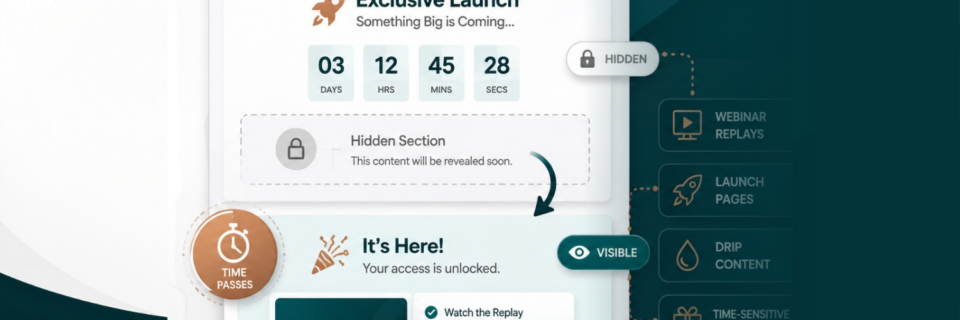
If you are running webinars, product launches, evergreen funnels, or drip content campaigns inside GoHighLevel, manually updating pages can quickly become frustrating. One missed deadline or forgotten update can create a poor user experience and cost conversions.
Fortunately, GoHighLevel includes built-in timer functionality that allows you to automatically hide and reveal sections of a webpage or funnel page based on either a time delay or a specific date and time. At Marketecs, we use these timer features regularly to build dynamic pages that feel interactive, personalized, and automated without requiring custom code.
Watch below as Kathrine Farris, Marketecs owner and founder, walks you through how to hide and reveal sections inside HighLevel pages, creating dynamic web pages, using timers.
In this guide, you’ll learn:
- How GoHighLevel timers work
- The difference between delay timers and countdown timers
- Real-world use cases for webinars and launches
- How to create urgency and drip content automatically
- Best practices for testing and implementation
Video Time Stamps
00:00 Build dynamic pages with timers (what we’re doing)
00:13 Why timers matter for launches, webinars, and drip content
01:17 Where timers live in GoHighLevel (Sites, Funnels vs Websites)
02:14 Webinar replay example: delay the booking calendar until your CTA
02:51 The two timer types: date countdown vs delay timers
03:53 Minute timer settings: expire actions (hide this, show that)
04:36 Revisit behavior + cookie reset rules (why testing gets weird)
05:35 Live test: timer expires, calendar appears automatically
05:58 Optional: hide timers in Layers (so visitors don’t see them)
06:49 Quick interruption: the 2 ways to work with me (affiliate vs Marketecs Engine)
08:09 Date-based countdown timer: hide content on a deadline
09:49 Use headlines + timers to create urgency without clutter
11:12 Testing tips: incognito, devices, browsers, time zones
12:01 Wrap up: launch-ready pages that run themselves
Links
Learn more about Marketecs Engine and its capabilities.
Need Help? Book a free consult.
Check out our YouTube Channel for more tips and tutorials.
What Are Dynamic Pages in GoHighLevel?
Dynamic pages are funnel or website pages that automatically change based on timing conditions.
Instead of manually editing a page during a launch or webinar campaign, timers can:
- Reveal hidden sections
- Delay calls to action
- Hide expired videos
- Unlock booking calendars
- Display offers after a presentation
- Add urgency with countdowns
This creates a more guided user experience while reducing manual work for your team.
Why Timer-Based Funnels Work So Well
Timed content works because it aligns your page experience with user behavior.
For example:
- A webinar replay can reveal the booking calendar only after the offer is introduced
- A launch page can automatically expire after a deadline
- A lead magnet can drip additional resources over time
A replay page can hide access after a specific date
Instead of overwhelming visitors with every option immediately, timers allow you to control the flow of information.
This often improves:
- Engagement
- Focus
- Appointment bookings
- Webinar watch time
- Conversion rates
Two Types of Timers in GoHighLevel
GoHighLevel currently offers two primary timer types for dynamic pages.
1. Delay Timers (Minute or Day Timers)
Delay timers reveal or hide elements after a visitor has been on the page for a set amount of time.
Example:
- A visitor watches a webinar replay
- At the 20-minute mark, the booking calendar appears
- The timer hides itself automatically
This is ideal for:
- Webinar funnels
- Delayed calls to action
- Drip content
- Sales presentations
- Lead qualification sequences
2. Countdown Timers (Date-Based Timers)
Countdown timers trigger actions at a specific date and time.
Example:
- A webinar replay expires Friday at midnight
- The video automatically disappears
- A waitlist or upgrade offer replaces it
This is ideal for:
- Product launches
- Replay deadlines
- Flash sales
- Enrollment periods
- Limited-time bonuses
How to Delay Offer Reveals on Funnel Pages in GoHighLevel
An example of an effective timer strategies is delaying a booking calendar until the exact moment your webinar or sales video introduces the call to action. Similarly, you could reveal any offer button at the exact time.
Step 1: Open Your Funnel Page
Inside GoHighLevel:
- Navigate to Sites
- Open Funnels
- Select the funnel step you want to edit
Most businesses use this on:
- Thank you pages
- Webinar replay pages
- Sales pages
- Lead nurture funnels
Step 2: Add Your Content Elements
For this example:
- Add your webinar video
- Add your booking calendar section
- Add any supporting headlines or buttons
At this point, the calendar should still be hidden.
Step 3: Add a Minute Timer
Drag the timer element into the page builder.
Then:
- Set the timer duration
- Configure the expire action
- Choose “Show Element”
- Select the booking calendar section
You can also:
- Hide the timer itself after expiration
- Reveal multiple elements simultaneously
Understanding Expire Actions and Revisit Behavior on Funnel Pages
One important setting inside GoHighLevel timers is the revisit behavior. This controls what happens if someone returns to the page later.
For example:
- A user visits the page once
- The timer expires
- The calendar appears
- The user returns tomorrow
Do they see the timer again? That depends on the cookie reset settings.
Most marketers leave the reset window around 30 days so returning visitors do not repeatedly experience the same timer sequence.
How to Create Deadline Funnels with Countdown Timers
Countdown timers are excellent for launches and urgency-driven campaigns.
Example Use Cases
- Webinar replay expires Friday
- Cart closes at midnight
- Bonus access ends in 48 hours
- Enrollment disappears after launch week
Setup Process
Inside the timer settings:
- Select Countdown Timer
- Set the target date and time
- Choose the timezone
- Configure the expire action
Typical expire actions include:
- Hide the video
- Hide the checkout form
- Show an expired offer message
- Redirect to a waitlist
How to Add Offer Urgency Without Feeling Pushy
Many countdown timers online feel overly aggressive. A better approach is using timers to improve clarity and flow.
Examples:
“Appointment calendar available in…”
“Replay expires in…”
“Bonus available until…”
This creates transparency while still encouraging action.
Kathrine also recommends pairing timers with supporting headlines to explain what happens when the timer ends.
Best Practices for Dynamic Funnels in GoHighLevel
1. Name Your Sections Clearly
This becomes critical when multiple timers exist on a page.
Proper naming makes it easier to:
- Identify sections
- Configure show/hide actions
- Avoid mistakes during edits
2. Test in Incognito Mode
Cookies can affect timer behavior during testing. Incognito windows help simulate a first-time visitor experience.
3. Test Across Devices
Always test:
- Desktop
- Mobile
- Multiple browsers
Timer behavior and layout may vary between devices.
4. Be Clear About Time Zones
If a deadline matters, clearly communicate the timezone.
Examples:
- “Offer expires at 11:59 PM EST”
- “Replay available until Friday midnight PST”
This avoids confusion and support issues.
Why This Feature Is Valuable for Webinars
Webinars are one of the strongest use cases for GoHighLevel timers.
Instead of showing every CTA immediately, you can:
- Match the page to the presentation timeline
- Reveal offers naturally
- Increase focus during the webinar
- Improve appointment booking timing
This creates a cleaner and more intentional funnel experience.
For evergreen webinars especially, automation becomes essential because you cannot manually manage every replay visitor.
Dynamic Funnels vs Static Pages
Here is the core difference:
Static Funnel Pages
- Same experience for everyone
- Manual updates required
- Immediate CTAs
- Fixed content
- No urgency logic
Dynamic Funnel Pages
- Changes based on timing
- Automated updates
- Timed CTA reveals
- Content drip functionality
- Built-in urgency and deadlines
Dynamic pages create a more guided customer journey.
Common Mistakes to Avoid
Showing the CTA or Offer Too Early
If the booking calendar appears before the presentation reaches the offer, conversions can decrease.
Forgetting Cookie Behavior
Not testing revisit logic can create confusing user experiences.
Ignoring Mobile Testing
Timers and hidden sections may display differently on smaller screens.
Overusing Urgency
Timers work best when they support the customer experience instead of forcing pressure.
Final Thoughts
GoHighLevel timers are one of the most underrated funnel features available for marketers, coaches, consultants, agencies, and online businesses.
By using dynamic page behavior, you can:
- Automate launch experiences
- Improve webinar engagement
- Create cleaner funnel flows
- Add urgency naturally
- Reduce manual page management
The best part is that these features can be implemented without custom development or advanced coding knowledge.
If you want help building advanced funnels, webinar automations, or dynamic customer journeys inside GoHighLevel, schedule a consultation call.