
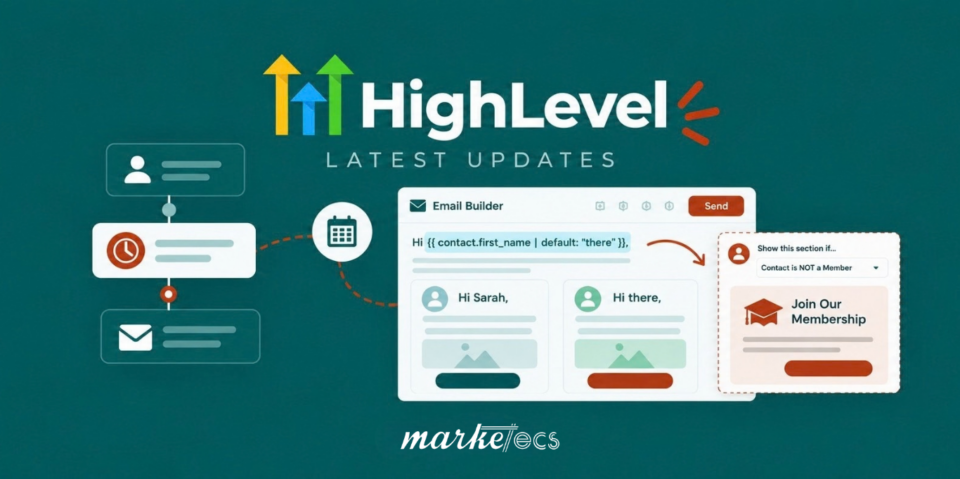
HighLevel continues to improve by making everyday marketing tasks easier to build, maintain, and personalize. Recent updates to the Wait action and Email Builder are good examples: date-based waits can now be configured directly, recurring schedules are easier to build, and email content can adapt to individual contacts without requiring multiple versions of the same campaign.
In this guide and accompanying videos, Marketecs founder Kathrine Farris explains these updates, why they matter, and how they solve problems that come up regularly in real-world automation. Start with Mastering the NEW Date-Based Wait Action in HighLevel and be sure to follow it up with the New GHL Email Builder Updates: Default Text + Conditional Content.
Try HighLevel free for 30 days, and get access to our affiliate bonuses.
The NEW Date-Based Wait Action in GHL
What Has Changed in the HighLevel Wait Action?
The HighLevel Wait action has received a substantial redesign.
Previously, building date-based automation could require a separate event start date followed by one or more Wait actions. That approach worked, but it added another layer of logic that had to be understood and maintained.
HighLevel’s redesigned Wait action now lets you configure a specific date directly inside the action. The previous two-step process of setting an event start date and then adding a Wait can now be handled in a single step.
The update also adds recurring wait schedules, including weekly, monthly, and yearly options. That is a meaningful improvement for anyone building event-based marketing.
For example, imagine you run a webinar every Tuesday at 9:00 AM.
You might want:
- A reminder one week before
- Another reminder three days before
- A reminder one hour before
- Follow-up messaging afterward
Previously, recurring events required more manual maintenance. The updated Wait action makes it possible to build around the recurring schedule itself.
The new Wait action also includes options for monthly and yearly schedules, specific dates, appointment-related timing, contact actions, replies, timeouts, and other conditions. HighLevel’s current documentation also notes support for dynamic wait durations, seconds as a wait unit, and an AI-assisted setup experience.
Why Does a Simpler Wait Action Matter?
Automation becomes difficult to manage when the logic behind it is difficult to understand.
A workflow that makes sense six months from now is more valuable than one that technically works today but requires excessive brainpower every time somebody needs to edit it.
That is especially important for agencies and businesses running:
- Webinars
- Challenges
- Courses
- Launches
- Appointment reminders
- Membership programs
- Recurring events
- Seasonal campaigns
- Annual renewal sequences
For HighLevel and Marketecs Engine users, these kinds of improvements can translate into less workflow maintenance and fewer opportunities for timing errors.
Try HighLevel free for 30 days, and get access to our affiliate bonuses.
New GHL Email Builder Updates: Default Text + Conditional Content
Video Time Stamps
00:00 Introduction: Summer in Maine and email marketing updates
00:22 HighLevel Summer AI deals
01:14 Inside Marketecs Engine and HighLevel options
01:57 Where email marketing lives inside GoHighLevel
02:16 Campaigns, templates, and the email builder
02:56 Quick tour of the email builder layout
03:25 Custom values and email personalization
04:06 New default text option for missing fields
04:35 How to avoid awkward blank-name emails
05:17 HighLevel and Marketecs Engine options
06:37 Updated conditional sending settings
07:06 Show or hide email blocks based on contact data
08:00 Using custom fields for audience-specific email content
08:49 Sending one email with different content blocks
09:23 Using AI to help with visibility conditions
10:27 More HighLevel email updates coming soon
10:50 Email marketing tutorials and related resources
11:58 Final thoughts
Learn more about Marketecs Engine, powered by HighLevel, and its capabilities.
Need Help? Book a free consult.
Check out our YouTube Channel for more tips and tutorials.
How Can HighLevel’s New Email Features Improve Personalization?
The other update we covered is inside the HighLevel Email Builder. Here’s what’s changed:
Default Text for Custom Values
HighLevel has long allowed you to insert custom values such as a contact’s first name into an email. For example:
Hi {{contact.first_name}},
But what happens when the contact does not have a first name?
Without a fallback value, you can end up with an awkward greeting.
The updated builder now lets you provide default text for a custom value. That means you can effectively configure the message to say Hi Sally, when the first name exists, but Hi there, when it does not.
This change may seem small, but it is exactly this type of small change that improves the quality of an automated system.
Why Does Fallback Text Matter?
Personalization only works when your underlying data is reliable, and real-world databases are rarely perfect.
Some contacts will have:
- No first name
- An incorrectly entered name
- A company name instead of a person’s name
- Partial information
- Older records with missing fields
A good automation should account for those situations rather than assuming every field will always be populated.
That is one of the practical lessons we see repeatedly when building marketing systems: build for imperfect data.
Email personalization is also worth taking seriously from a performance perspective. The American Marketing Association has cited research showing personalized emails can be 26% more likely to be opened, while personalized marketing can increase sales in some circumstances.
But personalization does not mean inserting someone’s first name into every sentence. The more useful application is making the message relevant to the person receiving it.
How Does Conditional Content Work in the HighLevel Email Builder?
This is where the update becomes more powerful. HighLevel now supports conditional visibility for elements within a single email. Instead of creating separate campaigns for different audiences, you can configure specific sections of an email to appear only when a contact meets certain conditions.
Consider a consultant who has both current members and non-members on the same email list. The email could contain a section promoting the membership program.
Rather than creating Email A for members and Email B for non-members, you can build one email and conditionally hide the membership promotion from existing members.
The result is a single campaign with different content presented to different contacts.
What Are Some Practical Examples of Conditional Email Content?
Here are a few ways we can see this being useful for the types of businesses we work with:
Membership businesses
Hide an invitation to join a membership from people who are already members.
Consultants
Show different calls to action based on the service or program associated with a contact.
Education businesses
Display different course recommendations based on enrollment status.
Local businesses
Show location-specific information based on a contact’s location field.
Agencies
Present different resources based on lead source, industry, service interest, or client status.
Event marketing
Show different information to registrants, attendees, prospects, or past attendees.
Does this conditional content replace email segmentation?
No. Conditional content and segmentation solve different problems.
Segmentation determines who receives a message, while conditional content determines what someone sees inside that message.
You can use both.
For example, you might send a newsletter to your entire database while using conditional blocks to show different sections based on industry, customer status, or other contact information. That can make a single email much more useful without turning your account into a collection of nearly identical campaigns.
Why Do These HighLevel Updates Matter?
Email remains an important marketing channel, which makes improvements to the tools behind it worth paying attention to.
Litmus reports that email generates an average return of $36 for every $1 spent, while its 2025 research found that 35% of marketing leaders reported returns between $10 and $36 for every dollar invested, and another 30% reported returns between $36 and $50.
At the same time, email teams have to balance personalization with frequency and relevance. Litmus reported in 2024 that half of marketers required more than two weeks to produce a single email, while 67% of consumers said they receive too many emails.
That combination creates a practical challenge. Businesses need to produce relevant communication efficiently without simply sending more messages. Features such as default values, conditional content, reusable templates, automation logic, and recurring waits address that challenge at the infrastructure level.
As Chad S. White, former Director of Research at Litmus, observed:“Email consistently and undisputedly provides the biggest returns in digital marketing.”
His larger point was that organizations should invest in improving the sophistication of their email programs rather than simply being satisfied with a high percentage return. That is exactly where platform improvements become relevant.
Is HighLevel Still Improving Outside of These Features?
Yes, and this is one of the broader reasons we continue paying attention to each and every update.
The current HighLevel changelog shows an ongoing stream of updates across automations, reporting, AI, websites, mobile, communities, invoicing, templates, and other areas.
The speed work is particularly worth watching.
HighLevel has published updates describing workflow builder load-time improvements of up to 4x in some scenarios. It has also documented improvements to funnel builder page switching, website rendering, API usage, and other performance areas.
A feature can be powerful, but if the interface is slow or cumbersome, people use it less effectively.
The current product direction appears to include both sides of that equation: adding capabilities while also working on the underlying experience.
How Can You Take Advantage of These HighLevel Automation and Email Updates?
If you already use HighLevel, I would not recommend rebuilding every workflow simply because a new feature exists.
Instead, look for places where the new functionality solves an existing maintenance problem.
Here are five useful places to start.
1. Review workflows built around event dates
Look for workflows where you previously had to establish an event start date before using date-based waits. See whether the newer Wait action lets you simplify that sequence.
2. Find recurring campaigns that require manual resets
If you run a weekly webinar, monthly workshop, recurring challenge, or annual campaign, review how those workflows are currently scheduled. A recurring Wait may eliminate some of the manual date changes.
3. Add fallback values to important personalized emails
Review your automated emails that use first names, company names, appointment information, or other custom values. Ask what happens when that field is blank. If the answer is “the email looks strange,” add an appropriate default value.
4. Consolidate duplicate emails
Look for campaigns that exist in multiple versions because different audiences see different sections. Ask whether conditional visibility could allow you to combine those versions into a single email.
5. Keep an eye on the changelog
This is perhaps the most important habit. HighLevel is changing frequently enough that the best workflow design approach can change over time.
The official HighLevel Changelog provides a running list of product improvements, while the HighLevel Ideas Board provides a place to see feedback and feature requests.
If you build automations professionally, checking these resources periodically can help you avoid continuing to solve a problem manually after the platform has already introduced a better option.
What Does This Mean for Marketecs Engine Users?
Not every new feature belongs in every account.
The job is to understand what changed, identify where it solves a real business problem, and implement it where it makes the system easier to operate. Technology should reduce complexity, not give you another collection of features to manage.
The recent Wait action and Email Builder updates are good examples of where platform improvements can translate into practical changes:
- Fewer steps in date-based workflows
- Easier recurring event automation
- Better handling of incomplete contact data
- More relevant email content
- Fewer duplicate campaigns
- Easier workflow maintenance
- More flexible personalization
And the development does not appear to be slowing down. The current HighLevel changelog continues to show new functionality and performance work across the platform.
For businesses using HighLevel, that creates an important opportunity: revisit the systems you built six months or a year ago. Some of those workflows may now be more complicated than they need to be.
Want Help Putting These Updates to Work?
If you are using HighLevel or Marketecs Engine and want to know where these updates could simplify your current marketing system, start by reviewing your most maintenance-heavy workflows.
Identify one recurring campaign, one date-based automation, and one email sequence with multiple audience versions. Those three areas are likely to give you a useful starting point for testing the newer functionality without rebuilding your entire system.
And if you want to keep up with what HighLevel is changing, bookmark the HighLevel Changelog and Ideas Board.
The platform is moving quickly. Your automation strategy should be able to take advantage of that without requiring you to rebuild everything from scratch.
Frequently Asked Questions About HighLevel Updates
What is the new HighLevel Wait action?
The redesigned HighLevel Wait action lets users configure different types of waits from a more intent-based interface. It supports options including specific dates, recurring schedules, contact actions, appointment timing, time delays, and other conditions. The updated system can also configure a specific date directly without requiring a separate event start date action.
Can HighLevel workflows wait until a specific date?
Yes. The updated Wait action can be configured to wait until a specific date and time. HighLevel’s changelog states that this can now be configured as a single step rather than requiring a separate Set Event Start Date action.
Can HighLevel automate recurring events?
Yes. The updated Wait action supports recurring weekly, monthly, and yearly schedules. This can be useful for recurring webinars, workshops, reminders, annual communications, and other scheduled events.
What is conditional content in the HighLevel Email Builder?
Conditional content lets you control whether specific elements inside an email are visible based on contact information. This allows one email campaign to display different sections to different contacts without requiring separate campaigns for each audience.
What is default text in HighLevel custom values?
Default text provides a fallback when a custom value is empty. For example, an email can use a contact’s first name when it is available but use a generic greeting such as “there” when the first-name field is blank.
Where can I find the latest HighLevel updates?
The official HighLevel Changelog is the best place to review released improvements and updates. HighLevel also maintains an Ideas Board where users can review and submit feature requests.
Does Marketecs Engine use HighLevel?
Yes. Marketecs Engine is built on the HighLevel platform. That means HighLevel’s underlying product improvements can become opportunities to improve the workflows, automations, and marketing systems used within Marketecs Engine.
Need help with GHL?
Book a free consult. We would be happy to chat about what you’re building and how we may be able to help.
Check out our YouTube Channel for more FREE tips and tutorials.
Looking to get started with GHL?
Try HighLevel free for 30 days, and get access to our affiliate bonuses.