
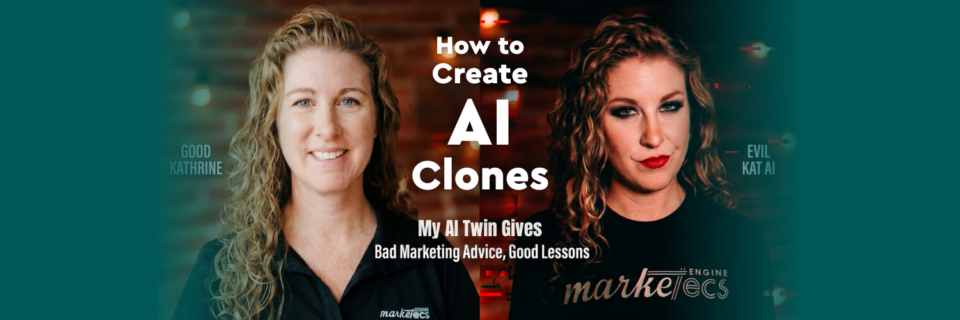
If you or your company’s thought leader is the bottleneck in your content strategy, an AI clone could help remove that constraint and help you produce consistent video content in less time.
In this video, Kathrine Farris, Marketecs owner and founder, walks through exactly how to build and deploy an AI clone to remove yourself as the bottleneck in your content marketing. You will see the full process in real time, from idea generation and scripting to avatar creation, thumbnail production, editing, publishing, and repurposing. If you have ever wondered how to produce consistent, scalable video content without being on camera every day, this breakdown shows you the complete workflow step by step.
AND, keep scrolling for a look at Kathrine’s Evil AI Twin in action…
Video Time Stamps
00:00 AI Clone Videos for Content Marketing, Why This Works
01:32 My AI Avatar Video Workflow, From Idea to Repurposing
02:54 Step 1, Choose Topics Fast (Project Management Setup)
04:46 Step 2, Write Scripts Faster with a Custom GPT (Hooks, CTAs)
08:36 Step 3, Create an AI Avatar Video in HeyGen (Voice + Settings)
12:09 Step 4, Make YouTube Thumbnails with Nano Banana (fal.ai)
15:19 Step 5, Edit AI Videos in Descript (Text-Based Editing + Captions)
18:11 Step 6, Export, Editor Handoff, Upload, Share, Schedule Posts
19:53 Bonus, Pick Better YouTube Topics with vidIQ + FAQs
21:37 Wrap Up, Resources, Next Steps, Workshop Offer
Tools mentioned:
Find links to these and more at https://www.marketecs.com/automation-… (no opt-in required)
What Is an AI Video Clone?
An AI video clone is a digital avatar trained to represent your voice, appearance, and communication style so you can produce marketing videos without physically recording each one. By combining a structured content workflow, custom AI scripting, avatar generation, editing automation, and repurposing systems, businesses can create publish-ready videos in about an hour from idea to distribution.
What Is an AI Clone in Content Marketing?
An AI clone is a reusable digital version of you built with AI tools that replicate your voice, likeness, and messaging structure so you can scale video production without being on camera every time.
At Marketecs, we built an AI clone system to remove the founder bottleneck in video marketing. The goal was not automation for automation’s sake. The goal was consistency, speed, and structured repurposing.
The result is a repeatable process that includes:
- Ideation
- Script creation
- Title, description, and thumbnail asset generation
- AI avatar video production
- Editing
- Publishing
- Cross-platform repurposing
Why Build an AI Clone for Your Business?
Most professional service firms struggle with one major constraint. The expert is too busy to create content consistently. An AI clone solves that by creating a repeatable system rather than relying on inspiration or availability.
Benefits include:
- Faster content production
- Consistent messaging
- Easier repurposing across platforms
- Reduced filming time
- Predictable publishing cadence
When structured properly, this becomes a content engine rather than a one-off experiment.
The Complete AI Video Workflow
Step 1: Ideation Inside a Project Management System
The first mistake most businesses make is treating video creation as a creative exercise instead of an operational one.
We manage video production inside a dedicated project management system. Each video follows the same task structure:
- Ideation
- Script
- Assets
- Video generation
- Editing
- Publishing
- Cross-promotion
Video ideas are stored monthly and sourced from:
- Client FAQs
- Sales call questions
- LinkedIn conversations
- Industry frustrations
- Trending topics
- SEO and AI query research
Your best video ideas are often hiding inside repeated questions from prospects.
Step 2: Script Faster with a Custom GPT
Instead of prompting from scratch each time, we built a custom GPT trained for video production.
This custom environment includes:
- Hook structure
- Authority positioning
- CTA placement
- Agenda statements
- Thumbnail prompts
- Title variations
- Description formatting
Because it is pre-trained with our tone, ICP, and positioning, it generates:
- A 2-minute script
- Multiple YouTube title options
- A structured description
- Thumbnail image prompts
You still review and adjust. AI assists. It does not replace strategic thinking.
If you create videos regularly, build a dedicated AI workspace specifically for video production. Load your:
- Ideal client profile
- Brand voice
- Website copy
- Offers
- Common objections
This dramatically improves output quality.
Step 3: Generate Your AI Avatar Video
We use HeyGen for avatar video production and ElevenLabs for advanced voice cloning.
The process is straightforward:
- Upload a clear image or short video of yourself
- Create your avatar
- Connect or create your voice model
- Paste your script
- Adjust speed and expression settings
- Generate
For stylized or personality-driven content, expressive motion can be effective. For educational content, subtle settings often perform better.
Short videos are extremely affordable to generate and take only minutes to render.
Step 4: Create Thumbnails with AI
Thumbnails are generated using Nano Banana via fal.ai, although Google AI Studio is also an option.
We do not manually guess prompts. We have our custom GPT generate optimized thumbnail prompts aligned to:
- The hook
- Emotional contrast
- Curiosity gap
- Channel style
Typically, we generate 2 to 4 variations and test them over time.
Less cluttered thumbnails often outperform busy designs.
Step 5: Edit with Transcript-Based Software
We use Descript for transcript-based editing.
This allows you to:
- Delete filler words
- Shorten gaps
- Edit by modifying text
- Add captions instantly
- Create social clips
- Export transcripts for blog repurposing
For higher production polish, we hand the AI-generated clip to a video editor for:
- Intro and outro
- Transitions
- Sound leveling
- Branding overlays
AI handles the heavy lifting. Humans handle refinement.
Step 6: Publish and Repurpose
Once assets are finalized:
- Upload to YouTube
- Insert title and description
- Add tags and chapters
- Schedule or publish
Then repurpose across:
- Website blog
- Short-form clips
- Sales nurture sequences
Always publish to your own website. Owned platforms matter.
How to Choose AI Video Topics That Actually Perform
Many businesses guess. We recommend a hybrid strategy:
- Use tools like vidIQ to analyze outlier topics
- Identify recurring client questions
- Pull objections from consultation calls
- Analyze competitor comment sections
Hooks should follow a simple structure:
- Strong opening statement
- Authority positioning
- Clear agenda
Clarity retains attention.
AI Clone vs Traditional Video Production
AI Clone
- Best for consistency, speed, and scalable publishing
- Lower time investment
- Ideal for educational and recurring formats
- Requires structured scripting
Traditional Filming
- Best for high-emotion storytelling
- Higher production value
- Stronger personal connection
- Requires scheduling and filming time
Most professional brands benefit from using both strategically.
Our ‘Evil AI Twin’ Approach
Our approach to creating an AI clone or avatar was to create something entertaining and obviously AI. We used this tech as an opportunity to create an evil clone of our founder, who uses satire to call out all the bad marketing ideas we’ve encountered and continue to encounter. K.A.T (Kathrine’s Artificial Twin) is… well… see for yourself:
And catch the entire series on this playlist – https://www.youtube.com/playlist?list=PLcrndugBh1Md-uMKGmrwQdKXabrHIdg4o
Common Concerns and Frequently Asked Questions About AI Clones
Will using AI feel inauthentic?
It can if you skip personalization. Always refine scripts to match your real voice.
Is AI too robotic?
Modern tools produce natural speech when properly configured.
Will clients and prospects know it’s AI?
Often they will not. Transparency is optional but recommended if relevant to brand positioning.
Does AI video replace real video?
It doesn’t have to. We recommend you use AI video to supplements and scale your video production efforts.
Is it expensive to create and use AI in video production?
Short videos are typically low cost per output, and AI credits are often less expensive than human costs for manual production.
How long does it take to build an AI clone?
Initial setup can take a few hours. After that, video production can take under an hour per video.
Can small businesses use AI clones?
Yes. In fact, small teams benefit most because it removes the founder bottleneck.
Do AI videos rank on YouTube?
Yes, if they solve real problems and follow strong topic and metadata strategy.
What tools are required?
At minimum: a scripting AI workspace, avatar generator, editing tool, and publishing workflow.
Should I disclose that my video is AI generated?
It depends on your brand. Some brands lean into it. Others skip the disclosure and focus on the value delivered.
Can AI clones help with repurposing content?
Yes. Transcripts can become blog posts, emails, and social posts quickly. Check out our Content Machine process for our exact steps.
Does this work for consultants and agencies?
Yes. AI avatars can work for entertainment, informative, educational, and authority driven content.
Next Steps
If you are exploring AI-driven content production and want to implement a structured system instead of random experimentation, our team can help.
If you want:
- A custom GPT built for your brand
- An AI video production system
- A scalable content marketing workflow
- A strategy for ranking in both Google and AI answer engines
Contact Marketecs to schedule a strategy session and evaluate whether an AI clone system makes sense for your business.